- Overview
- Tutorials
- Getting started
- Get started with Canton and the JSON Ledger API
- Get Started with Canton, the JSON Ledger API, TypeScript and WebSockets
- Get Started with Canton, the JSON Ledger API, and TypeScript
- Get started with Canton Network App Dev Quickstart
- Using the JSON Ledger API
- Deploy Quickstart to DevNet
- Appendix
- Get started with smart contract development
- Basic contracts
- Test templates using Daml scripts
- Build the Daml Archive (.dar) file
- Data types
- Transform contracts using choices
- Add constraints to a contract
- Parties and authority
- Compose choices
- Handle exceptions (Deprecated)
- Work with dependencies
- Functional programming 101
- The Daml standard library
- Test Daml contracts
- Next steps
- Interfaces
- Application development
- Getting started
- Development how-tos
- Component how-tos
- Explanations
- References
- Application development
- Smart contract development
- Daml language cheat sheet
- Daml language reference
- Overview: Template Structure
- Reference: Templates
- Reference: Choices
- Reference: Updates
- Reference: Data Types
- Reference: Built-in Functions
- Reference: Expressions
- Reference: Functions
- Reference: Daml File Structure
- Reference: Daml Packages
- Reference: Contract Keys
- Reference: Interfaces
- Reference: Exceptions (Deprecated)
- Reference: Serializable
- Fixity, Associativity and Precedence
- Daml standard library
- DA.Action.State.Class
- DA.Action.State
- DA.Action
- DA.Assert
- DA.Bifunctor
- DA.Crypto.Text
- DA.Date
- DA.Either
- DA.Exception
- DA.Fail
- DA.Foldable
- DA.Functor
- DA.Internal.Interface.AnyView.Types
- DA.Internal.Interface.AnyView
- DA.List.BuiltinOrder
- DA.List.Total
- DA.List
- DA.Logic
- DA.Map
- DA.Math
- DA.Monoid
- DA.NonEmpty.Types
- DA.NonEmpty
- DA.Numeric
- DA.Optional
- DA.Record
- DA.Semigroup
- DA.Set
- DA.Stack
- DA.Text
- DA.TextMap
- DA.Time
- DA.Traversable
- DA.Tuple
- DA.Validation
- DA.ContractKeys
- GHC.Show.Text
- GHC.Tuple.Check
- Prelude
- Daml Script
- Smart contract upgrading reference
- Glossary of concepts
Using the JSON Ledger API
Overview
You are ready to extend the CN Quickstart to interact directly with your LocalNet. You’ll learn how to programmatically create parties, upload DARs, create contracts, and integrate with Canton Coin (Amulet) using OAuth2 authentication against your running LocalNet. By the end, you’ll have the hands-on experience with critical API patterns needed to build your own Canton Network applications.
Prerequisites
This guide requires the Digital Asset Package Manager. Follow installation instructions at DPM. (Exception: if you’re running Daml 3.3, then use the Daml Assistant.)
You should have also finished the Quickstart installation and Explore the demo tutorial. We also recommend reading the developer journey lifecycle to better understand how Quickstart bootstraps your Canton Network development by providing the tooling you will need for any CN app.
LocalNet interaction expectations vs Explore the demo (using app vs developer skills)
In the demo, you interacted with LocalNet through the web interface as a user. Now you’ll take control of LocalNet directly through APIs, learning to programmatically manage the network infrastructure that will become your foundation for building on ScratchNet, TestNet, and beyond.
Project directory structure
The CN Quickstart contains the following directory structure:
cn-quickstart/
├── daml/                  # daml contracts and project files
│   ├── User.daml          # user management
│   ├── Provider.daml      # license provider
│   └── License.daml       # license management
├── backend/               # API integration points
├── frontend/              # UI
└── config/                # LocalNet settings, including OAuth2 and port settings
You’ll work primarily in daml/ to extend the licensing contracts with a new LicenseHistory.daml contract that tracks ownership transfers
LocalNet env & auth
Env verification
The Quickstart application should be built and running. Verify that all services are operational in the terminal with make status.

Port mappings
Security consideration
The port mappings for LocalNet expose the AdminAPI port and the Postgres port,
both of which would normally be a security risk.
However, having direct access to these ports when running on a local developer’s machine can be useful.
These ports should not be exposed when preparing deployment configurations for non-local deployments.
The port suffixes are defined as environment variables.
For any port mappings you wish to disable,
you can find and remove the relevant Docker port: entry in the appropriate file.
JSON API ports
(2975, 3975, 4975): Daml ops and smart contract deployment
Validator API ports
(2903, 3903, 4903): status monitoring
OAuth2 & token mgmt
Overview
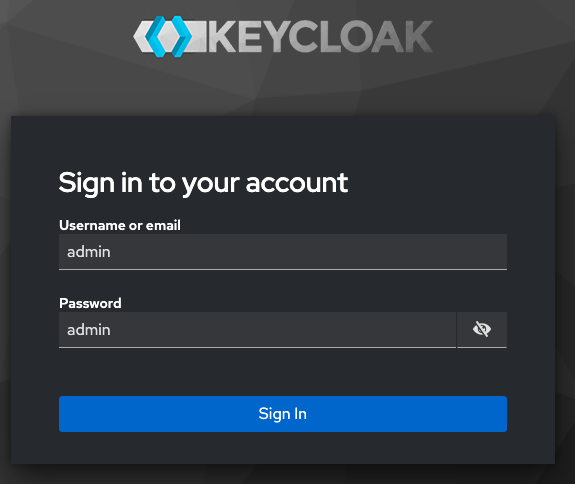
LocalNet uses Keycloak at http://keycloak.localhost:8082 for OAuth2 authentication with two realms: AppUser and AppProvider.
You can login to Keycloak at this port by using the username and password admin.
Read ref:keycloak-in-cnqs To learn more about Keycloak.
JSON API Tutorial
In this tutorial, you’re making API calls to simulate the steps taken in the Quickstart web app by requesting JWT tokens,
then include them as Bearer tokens in API calls.
Start the application and tools from the quickstart/ directory.
Begin capture logs
make capture-logs
Allow capture logs to run in its terminal window.
In a new terminal window, run the Quickstart application with make start.
Once complete, this can become your working terminal window.
After make start completes, open a new terminal window to initiate lnav.
Start lnav with lnav logs/*.clog to capture and analyze logs.
If there are no clogs you might try running make stop && make clean-all then rerunning make start.
Alternatively, you can begin this guide to make transactions on the ledger.
This should cause clogs to self-generate.
This command launches lnav to trace transactions, debug issues, and monitor system behavior as you work.
Keep lnav running in its terminal window.
Get a Token
Use the AppUser validator client to get a token.
export USER_ADMIN_TOKEN=$(curl -fsS "http://keycloak.localhost:8082/realms/AppUser/protocol/openid-connect/token" \
  -H "Content-Type: application/x-www-form-urlencoded" \
  -d "client_id=app-user-validator" \
  -d "client_secret=6m12QyyGl81d9nABWQXMycZdXho6ejEX" \
  -d "grant_type=client_credentials" \
  -d "scope=openid" | jq -r .access_token)
(client_secret is set in oauth2.env and AppUser-realm.json)
An empty return indicates success.
Verify the token
echo $USER_ADMIN_TOKEN
Use the token
List existing parties and include the token in API requests
curl -H "Authorization: Bearer $USER_ADMIN_TOKEN" \
  http://localhost:2975/v2/parties
Save the DSO Party
DSO_PARTY=$(curl -s "http://localhost:2975/v2/parties" \
  -H "Authorization: Bearer $USER_ADMIN_TOKEN" | \
  jq -r '.partyDetails[] | select(.party | startswith("DSO::")) | .party')
echo "DSO Party: $DSO_PARTY"
You’re now ready to make authenticated JSON API calls to your LocalNet.
Token management troubleshooting
Tokens expire after a period. If API calls return Cannot iterate over null or 401 Unauthorized,
regenerate your token with the command above. For production patterns,
see quickstart/docker/modules/splice-onboarding/docker/utils.sh for token management utilities.
Create a party
Create a new party on the AppUser validator.
curl -X POST http://localhost:2975/v2/parties \
  -H "Authorization: Bearer $USER_ADMIN_TOKEN" \
  -H "Content-Type: application/json" \
  -d '{
    "partyIdHint": "Alice"
  }'
You can use any name as the partyIdHint value.
Canton may append additional characters for uniqueness.
Success Response:
{
  "partyDetails": {
    "party": "Alice::122091f5d8d174bc0d624616d4f366904f8d4c56d56e33508878db3156c3dd9b8ae9",
    "isLocal": true,
    "localMetadata": { "resourceVersion": "0", "annotations": {} },
    "identityProviderId": ""
  }
}
Troubleshoot common party creation issues
A security-sensitive error has been received or 401 Unauthorized: Token expired - regenerate with the OAuth2 command
INVALID_ARGUMENT, Party already exists, or 400 Bad Request: Party might already exist - check with:
curl -X GET http://localhost:2975/v2/parties \
  -H "Authorization: Bearer $USER_ADMIN_TOKEN"
Upload a DAR
Upload the prebuilt licensing DAR to the validator.
curl -X POST http://localhost:2975/v2/packages \
  -H "Content-Type: application/octet-stream" \
  -H "Authorization: Bearer $USER_ADMIN_TOKEN" \
  --data-binary @./daml/licensing/.daml/dist/quickstart-licensing-0.0.1.dar
Success looks like:
{}
DAR Upload issues
404 Not Found: Verify DAR path is correct from your current directory 413 Payload Too Large: DAR exceeds size limit 409 Conflict: Package already uploaded curl: (52) Empty reply from server: Network issue - retry Check lnav for detailed upload logs and any processing errors.
Create a contract on LocalNet
Inspect the DAR to find the package hash. Find and save the package ID, a 64-character hex string.
dpm damlc inspect-dar daml/licensing/.daml/dist/quickstart-licensing-0.0.1.dar
We suggest copying and pasting this command for your convenience. If you choose to type it out, you may need to type the full directory without the use of autocomplete.
The desired value may vary between SDK versions. You can identify the main package by the project name in the package list.
The format follows:
<project-name>-<version>-<package-id>
At the time of publication, the repeating string of b59ffbf847ac36fee1a4a743864274c5d8ab6f02ea8899f49fb5347e9978543f is the project ID that we seek.
Alternatively, if you’re querying the quickstart-licensing DAR, as we do in this tutorial, you can quickly grep and save the project ID with:
PACKAGE_ID=$(dpm damlc inspect-dar daml/licensing/.daml/dist/quickstart-licensing-0.0.1.dar | grep "quickstart-licensing-0.0.1-" | grep -v "dalf" | tail -1 | awk '{print $2}' | tr -d '"')

echo $PACKAGE_ID
If you’d like to query a different DAR then change the file path.
Create the Contract
Renew your token to query the participant:
USER_ADMIN_TOKEN=$(curl -fsS "http://keycloak.localhost:8082/realms/AppUser/protocol/openid-connect/token" \
  -H 'Content-Type: application/x-www-form-urlencoded' \
  -d 'client_id=app-user-validator' \
  -d 'client_secret=6m12QyyGl81d9nABWQXMycZdXho6ejEX' \
  -d 'grant_type=client_credentials' \
  -d 'scope=openid' | jq -r .access_token)
Get PROVIDER_ADMIN_TOKEN
PROVIDER_ADMIN_TOKEN=$(curl -f -s -S "http://keycloak.localhost:8082/realms/AppProvider/protocol/openid-connect/token" \
  -H 'Content-Type: application/x-www-form-urlencoded' \
  -d 'client_id=app-provider-validator' \
  -d 'client_secret=AL8648b9SfdTFImq7FV56Vd0KHifHBuC' \
  -d 'grant_type=client_credentials' \
  -d 'scope=openid' | jq -r .access_token)
Get the user token:
USER_TOKEN=$(curl -f -s -S "http://keycloak.localhost:8082/realms/AppUser/protocol/openid-connect/token" \
  -H 'Content-Type: application/x-www-form-urlencoded' \
  -d 'client_id=app-user-unsafe' \
  -d 'username=app-user' \
  -d 'password=abc123' \
  -d 'grant_type=password' \
  -d 'scope=openid' | jq -r .access_token)
Create the AppInstallRequest:
curl -X POST "http://localhost:2975/v2/commands/submit-and-wait" \
  -H "Authorization: Bearer $USER_TOKEN" \
  -H "Content-Type: application/json" \
  -d '{
    "commands": [{
      "CreateCommand": {
        "templateId": "'"$PACKAGE_ID"':Licensing.AppInstall:AppInstallRequest",
        "createArguments": {
          "provider": "'"$APP_PROVIDER_PARTY"'",
          "user": "'"$APP_USER_PARTY"'",
          "meta": {"values": {}}
        }
      }
    }],
    "workflowId": "install-request",
    "applicationId": "'"$APP_USER_ID"'",
    "commandId": "req-'"$(date +%s%N)"'",
    "deduplicationPeriod": {"Empty": {}},
    "actAs": ["'"$APP_USER_PARTY"'"],
    "readAs": [],
    "submissionId": "install-request",
    "disclosedContracts": [],
    "domainId": "",
    "packageIdSelectionPreference": []
  }'
The return shows your first contract made on LocalNet via the JSON API ledger!
The return looks something like:
{
  "updateId": "122059bdefac3665d7a0e933017e8b4f68b5668945ca3ecca219bee89741f10b28b1",
  "completionOffset": 1666
}
updateId: A unique identifier for this ledger update/transaction. You can use this to track this specific operation in logs. completionOffset: The position in the ledger where this transaction was committed. For example, 1666 means this was the 1,666th transaction on this participant.
See the contract creation in lnav by filtering for AppInstallRequest or filter by the updateId value.
:filter-in AppInstallRequest
The results show detailed information including the trace IDs. Trace IDs can be used to follow related activity throughout the complete business operation.

In this screenshot, deb9fe66dfb7990e5268f3690dbe53e8 and 61af0b8172d45909f9f8e8c5c4d46f16 are examples of trace IDs.
Access the contract in daml shell
Open daml shell to query for the created contract.
In a new terminal window, from the quickstart/ directory run make shell
Query the AppInstallRequest contract:
active quickstart-licensing:Licensing.AppInstall:AppInstallRequest

Use the displayed portion of the contract ID to display the contract details.
In daml shell run the command contract followed by your unique Contract ID.
In this case: contract 0044e9b until there are no other contract options.
Press tab to complete the contract ID and enter to see the contract details.
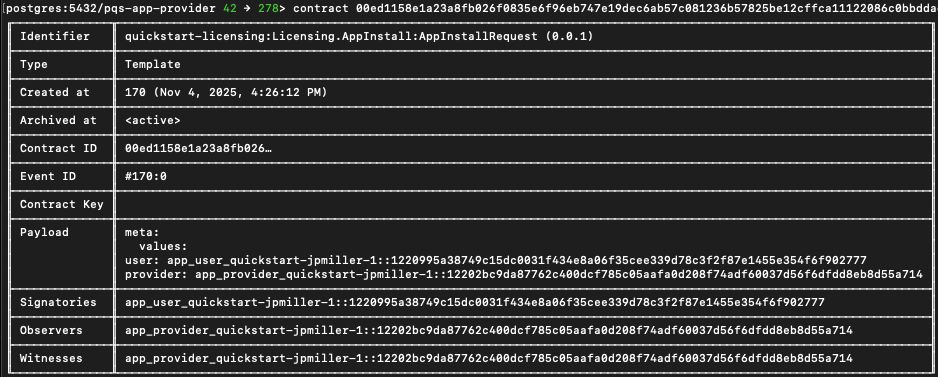
Copy and save the contract ID to a new INSTALL_REQ_CID variable in the previous working terminal.
INSTALL_REQ_CID="###"
Find the AppInstallRequest contract
Get the provider user token as a password grant for party rights.
PROVIDER_TOKEN=$(curl -f -s -S "http://keycloak.localhost:8082/realms/AppProvider/protocol/openid-connect/token" \
  -H 'Content-Type: application/x-www-form-urlencoded' \
  -d 'client_id=app-provider-unsafe' \
  -d 'username=app-provider' \
  -d 'password=abc123' \
  -d 'grant_type=password' \
  -d 'scope=openid' | jq -r .access_token)
Exercise the Accept choice on the first contract:
JSON_PAYLOAD=$(cat <<EOF
{
  "commands": [{
    "ExerciseCommand": {
      "templateId": "$PACKAGE_ID:Licensing.AppInstall:AppInstallRequest",
      "contractId": "$INSTALL_REQ_CID",
      "choice": "AppInstallRequest_Accept",
      "choiceArgument": {
        "installMeta": {"values": {}},
        "meta": {"values": {}}
      }
    }
  }],
  "workflowId": "accept-install",
  "applicationId": "app-provider-app",
  "commandId": "accept-$(date +%s%N)",
  "actAs": ["$APP_PROVIDER_PARTY"],
  "readAs": [],
  "submissionId": "accept-install",
  "disclosedContracts": [],
  "domainId": "",
  "packageIdSelectionPreference": []
}
EOF
)

curl -X POST "http://localhost:3975/v2/commands/submit-and-wait" \
  -H "Authorization: Bearer $PROVIDER_TOKEN" \
  -H "Content-Type: application/json" \
  -d "$JSON_PAYLOAD"
SUCCESS looks like {"updateId":"1220064a62356625ab7338564daedd21487749a7fcd21ad1d3a659b9131e9aadc246","completionOffset":109}%
Generate a token for the app provider
PROVIDER_ADMIN_TOKEN=$(curl -fsS "http://keycloak.localhost:8082/realms/AppProvider/protocol/openid-connect/token" \
  -H 'Content-Type: application/x-www-form-urlencoded' \
  -d 'client_id=app-provider-validator' \
  -d 'client_secret=AL8648b9SfdTFImq7FV56Vd0KHifHBuC' \
  -d 'grant_type=client_credentials' \
  -d 'scope=openid' | jq -r .access_token)
Check if app-provider user exists
curl -s "http://localhost:3975/v2/users" \
  -H "Authorization: Bearer $PROVIDER_ADMIN_TOKEN" | jq '.users[] | select(.metadata.annotations.username == "app-provider")'
If the app-provider user exists, get the party and verify it’s set (if it fails review the previous steps):
APP_PROVIDER_USER_ID=$(curl -s "http://localhost:3975/v2/users" \
  -H "Authorization: Bearer $PROVIDER_ADMIN_TOKEN" | \
  jq -r '.users[] | select(.metadata.annotations.username == "app-provider") | .id')

echo "APP_PROVIDER_USER_ID: $APP_PROVIDER_USER_ID"
The APP_PROVIDER_USER_ID should equal the “id” value.
Return to daml shell to query for the AppInstall contract ID
active quickstart-licensing:Licensing.AppInstall:AppInstall
Use the contract command as before to isolate and copy the complete contract id.
Back to the shell terminal
APP_INSTALL_CID="..."
You may verify that all of your variables are set:
echo "User Party: $APP_USER_PARTY"
echo "Provider Party: $APP_PROVIDER_PARTY"
echo "App Provider User ID: $APP_PROVIDER_USER_ID"
echo "Provider Token: ${PROVIDER_TOKEN:0:50}..."
echo "Package ID: $PACKAGE_ID"
echo "DSO Party: $DSO_PARTY"
echo "Contract ID: $APP_INSTALL_CID"
Check that the token is valid
curl -s "http://localhost:3975/v2/users/$APP_PROVIDER_USER_ID" \
  -H "Authorization: Bearer $PROVIDER_TOKEN" | jq .
A valid token shows the provider token meta data.
An invalid token may show “a security-sensitive error has been received”
curl -s "http://localhost:3975/v2/users/$APP_PROVIDER_USER_ID" \
  -H "Authorization: Bearer $PROVIDER_TOKEN" | jq
If needed, regenerate the session and then check that the token is valid, again.
PROVIDER_TOKEN=$(curl -f -s -S "http://keycloak.localhost:8082/realms/AppProvider/protocol/openid-connect/token" \
  -H 'Content-Type: application/x-www-form-urlencoded' \
  -d 'client_id=app-provider-unsafe' \
  -d 'username=app-provider' \
  -d 'password=abc123' \
  -d 'grant_type=password' \
  -d 'scope=openid' | jq -r .access_token)
Exercise the CreateLicense choice
JSON_PAYLOAD=$(cat <<EOF
{
  "commands": [{
    "ExerciseCommand": {
      "templateId": "$PACKAGE_ID:Licensing.AppInstall:AppInstall",
      "contractId": "$APP_INSTALL_CID",
      "choice": "AppInstall_CreateLicense",
      "choiceArgument": {
        "params": {
          "meta": {"values": {}}
        }
      }
    }
  }],
  "workflowId": "create-license",
  "applicationId": "app-provider-app",
  "commandId": "license-$(date +%s%N)",
  "actAs": ["$APP_PROVIDER_PARTY"],
  "readAs": [],
  "submissionId": "create-license",
  "disclosedContracts": [],
  "domainId": "",
  "packageIdSelectionPreference": []
}
EOF
)

curl -X POST "http://localhost:3975/v2/commands/submit-and-wait" \
  -H "Authorization: Bearer $PROVIDER_TOKEN" \
  -H "Content-Type: application/json" \
  -d "$JSON_PAYLOAD"
If you see an error “Contract could not be found with id then you have assigned an incorrect contract ID to a contractId variable.
{"code":"CONTRACT_NOT_FOUND","cause":"Contract could not be found with id 0093e43a6fe746a56fb38e02f897194764150545917f127c6eb2c96b69976d83f6ca111220e6f80978587f7b7cd8ebbd8e176b2bb976fc3a6d3c6762d6fb8aad8e3c210b9f","correlationId":"create-license","traceId":"1e8a0ba16a95ef0881b1edb46b6f177a","context":{"participant":"'app-provider'","category":"11","tid":"1e8a0ba16a95ef0881b1edb46b6f177a","definite_answer":"false","commands":"{readAs: [], deduplicationPeriod: {duration: 'PT30S'}, submittedAt: '2025-10-28T16:20:38.735022Z', submissionId: 'create-license', actAs: ['app_provider_quickstart-jpmiller-1::1220349240f3f941ea497e05c40ae2497f1f2684706c0212e8cba854510332676ed6'], commandId: 'license-1761668438670963000', userId: '553c6754-8879-41c9-ae80-b302f5af92c9', workflowId: 'create-license'}"},"resources":[["ErrorResource(CID)","0093e43a6fe746a56fb38e02f897194764150545917f127c6eb2c96b69976d83f6ca111220e6f80978587f7b7cd8ebbd8e176b2bb976fc3a6d3c6762d6fb8aad8e3c210b9f"]],"errorCategory":11,"grpcCodeValue":5,"retryInfo":null,"definiteAnswer":null}%
Success returns a new updateId and completionOffset.
{"updateId":"12209864eb06a5407b006e1ded12dbfa495bfedef74463a314000bbbd9e2e412d27e","completionOffset":2559}%
Get the License contract ID in daml shell
Return to daml shell to get the License contract ID.
active quickstart-licensing:Licensing.License:License
Copy the complete contract ID and return to the previous working terminal.
contract ###...
Save the license contract ID in a variable
LICENSE_CID="..."
Generate a unique renewal request
REQUEST_ID=$(uuidgen)
REQUESTED_AT=$(date -u +"%Y-%m-%dT%H:%M:%SZ")
PREPARE_UNTIL=$(date -u -v+60M +"%Y-%m-%dT%H:%M:%SZ")
SETTLE_BEFORE=$(date -u -v+90M +"%Y-%m-%dT%H:%M:%SZ")
Set the license extension
LICENSE_EXTENSION_DAYS=30
LICENSE_EXTENSION_MICROSECONDS=$((LICENSE_EXTENSION_DAYS * 24 * 60 * 60 * 1000000))
Create the license renewal request
If you receive a “security-sensitive error has been received” then renew the token as before.
As a sanity check you may preemptively renew the token.
PROVIDER_TOKEN=$(curl -f -s -S "http://keycloak.localhost:8082/realms/AppProvider/protocol/openid-connect/token" \
  -H 'Content-Type: application/x-www-form-urlencoded' \
  -d 'client_id=app-provider-unsafe' \
  -d 'username=app-provider' \
  -d 'password=abc123' \
  -d 'grant_type=password' \
  -d 'scope=openid' | jq -r .access_token)
Set the COMMAND_ID variable
COMMAND_ID="complete-$(date +%s%N)"
You have 15 minutes to allocate tokens and 30 minutes to complete the renewal request.
JSON_PAYLOAD=$(cat <<EOF
{
  "commands": [{
    "ExerciseCommand": {
      "templateId": "$PACKAGE_ID:Licensing.License:License",
      "contractId": "$LICENSE_CID",
      "choice": "License_Renew",
      "choiceArgument": {
        "requestId": "$REQUEST_ID",
        "licenseFeeInstrumentId": {
          "admin": "$DSO_PARTY",
          "id": "Amulet"
        },
        "licenseFeeAmount": "100.0",
        "licenseExtensionDuration": {
          "microseconds": $LICENSE_EXTENSION_MICROSECONDS
        },
        "requestedAt": "$REQUESTED_AT",
        "prepareUntil": "$PREPARE_UNTIL",
        "settleBefore": "$SETTLE_BEFORE",
        "description": "License renewal payment"
      }
    }
  }],
  "workflowId": "renew-license",
  "applicationId": "app-provider-app",
  "commandId": "$COMMAND_ID",
  "actAs": ["$APP_PROVIDER_PARTY"],
  "readAs": [],
  "submissionId": "renew-license",
  "disclosedContracts": [],
  "domainId": "",
  "packageIdSelectionPreference": []
}
EOF
)

curl -X POST "http://localhost:3975/v2/commands/submit-and-wait" \
  -H "Authorization: Bearer $PROVIDER_TOKEN" \
  -H "Content-Type: application/json" \
  -d "$JSON_PAYLOAD"
Success looks like: {"updateId":"122067883fdbb23d7395fabab7fc44703b3d588e44924fe1d33b45eebc116ecd94a5","completionOffset":220}%
LicenseRenewalRequest
Return to daml shell to get the LicenseRenewalRequest contract ID
active quickstart-licensing:Licensing.License:LicenseRenewalRequest
Execute the contract command to see the LicenseRenewalRequest contract details.
contract ###...
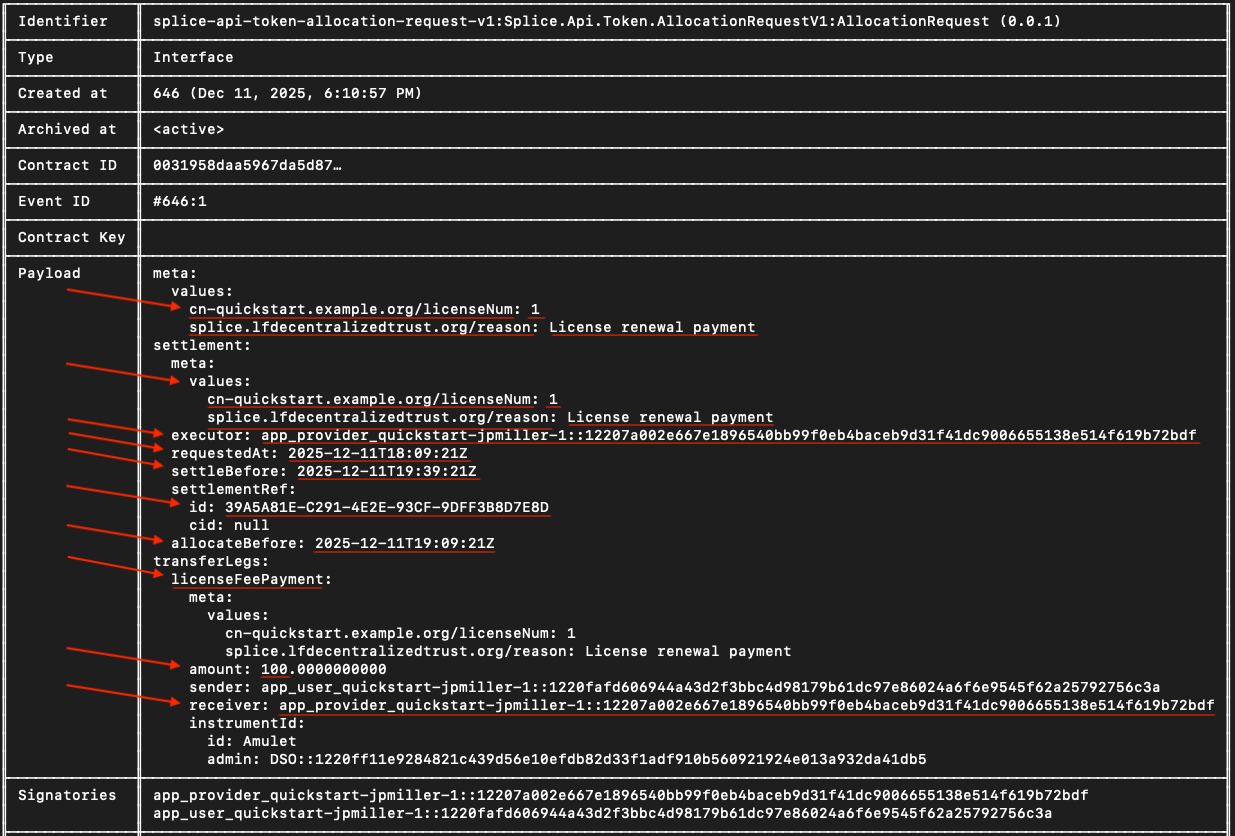
Take note of the Payload field.
You’ll use the metadata values to send the payment allocation in a future step.
Go back to the terminal and create a new RENEWAL_REQ_CID variable
RENEWAL_REQ_CID="###"
Return to the daml shell
LicenseRenewalRequest implements the AllocationRequest interface.
The user must allocate 100 CC tokens to satisfy the payment.
active splice-api-token-holding-v1:Splice.Api.Token.HoldingV1:Holding
If the return shows “<empty>”, wait a couple minutes and try again.
(It can take up to 15 minutes).
This is normal Canton Network behavior due to how the Participant Query Store (PQS) works.
Before the holding, or any other on-ledger activity shows in the daml shell,
the transaction must be processed on the ledger,
PQS polls the participant for new events and updates its database,
and after the sync completes the queries return the new data.
The value in amount needs to be more than 100 to complete this step.
In LocalNet, the Canton Wallet automatically replenishes tokens in each round. If your amount shows less than 100, then you most likely only need to wait a few minutes for the wallet to build up to a satisfactory amount.
Optional: If you’d like to view more details, call the Holding contract ID.
Navigate to the Canton Wallet UI at http://wallet.localhost:2000/allocations
Log in as app-user with password abc123
In the demo, the allocation was completed for you via backend processes in the web app. Now, we need to fill out the allocation request manually
You need to manually create an allocation for the daml shell allocation contract even if the UI shows an allocation request.
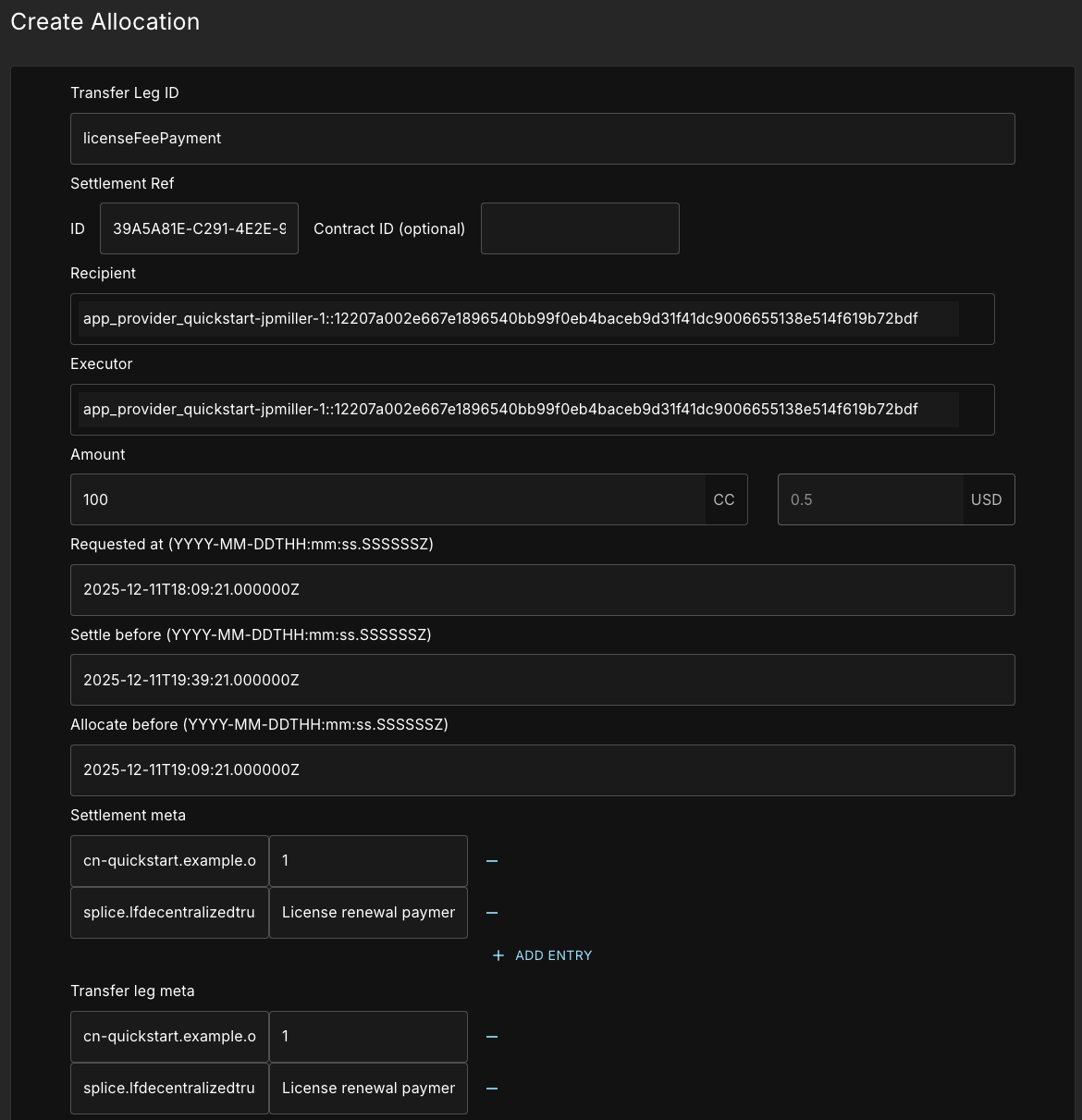
Use the Payload metadata mentioned above to fill in all the fields surrounded by red.
Transfer Leg ID:
licenseFeePaymentSettlement Ref ID:
settlementRef.idRecipient:
receiverExecutor:
executorAmount:
100Requested At:
requestedAtSettle before:
settleBeforeAllocate before:
allocateBefore
Add two custom entries for the Settlement meta and Transfer leg meta, each.
Key:
cn-quickstart.example.org/licenseNumValue:
1Key:
splice.lfdecentralizedtrust.org/reasonValue:
License renewal payment
Do NOT wrap values in quotes. Canton Wallet adds escaped quotes.
Both key value pairs go in both meta options.
To find the necessary information,
look at the LicenseRenewalRequest contract payload field in daml shell.
For the times Requested At, Settle before, and Allocate before,
you will need to manually enter a “.” before the “Z” followed by six (6) “0”s.
For example, requestedAt: 2025-10-29T20:38:16Z becomes
2025-10-29T20:38:16.000000Z
Send the request once all information is complete.
Regenerate the provider token in case of security-sensitive errors
Tokens automatically expire over time. This is a security measure and no fault of your own if you experience such errors.
PROVIDER_TOKEN=$(curl -f -s -S "http://keycloak.localhost:8082/realms/AppProvider/protocol/openid-connect/token" \
  -H 'Content-Type: application/x-www-form-urlencoded' \
  -d 'client_id=app-provider-unsafe' \
  -d 'username=app-provider' \
  -d 'password=abc123' \
  -d 'grant_type=password' \
  -d 'scope=openid' | jq -r .access_token)
Return to the terminal and get a user token
USER_TOKEN=$(curl -f -s -S "http://keycloak.localhost:8082/realms/AppUser/protocol/openid-connect/token" \
  -H 'Content-Type: application/x-www-form-urlencoded' \
  -d 'client_id=app-user-unsafe' \
  -d 'username=app-user' \
  -d 'password=abc123' \
  -d 'grant_type=password' \
  -d 'scope=openid' | jq -r .access_token)
Look up the Allocation Contract ID
Query for the allocation in daml shell
active splice-api-token-allocation-v1:Splice.Api.Token.AllocationV1:Allocation
Save the allocation contract ID as ALLOCATION_CID=”###”
Double check that the license renewal request, allocation , and license contract IDs are different.
You may verify contract ID variables with values in daml shell.
echo "Renewal Request: $RENEWAL_REQ_CID"
echo "Allocation: $ALLOCATION_CID"
echo "License: $LICENSE_CID"
echo "User Party: $APP_USER_PARTY"
echo "Provider Party: $APP_PROVIDER_PARTY"
echo "App Provider User ID: $APP_PROVIDER_USER_ID"
echo "Provider Token: ${PROVIDER_TOKEN:0:50}..."
echo "Package ID: $PACKAGE_ID"
echo "DSO Party: $DSO_PARTY"
echo "Contract ID: $APP_INSTALL_CID"
Renew the token
PROVIDER_TOKEN=$(curl -fsS "http://keycloak.localhost:8082/realms/AppProvider/protocol/openid-connect/token" \
  -H 'Content-Type: application/x-www-form-urlencoded' \
  -d 'client_id=app-provider-unsafe' \
  -d 'username=app-provider' \
  -d 'password=abc123' \
  -d 'grant_type=password' \
  -d 'scope=openid' | jq -r .access_token)
Generate a unique command ID
COMMAND_ID="complete-renewal-$(date +%s%N)"
Set the endpoint path to connect to the backend service to complete the license renewal
A backend service is required for this step because the DSO and the user exchange information stored in lockedAmulet.
This information is not available to the Provider and therefore cannot be accessed via the daml shell.
ENDPOINT="http://localhost:8080/licenses/${LICENSE_CID}:complete-renewal"
Create a variable for the request body
REQUEST_BODY=$(cat <<EOF
{
  "renewalRequestContractId": "$RENEWAL_REQ_CID",
  "allocationContractId": "$ALLOCATION_CID"
}
EOF
)
Make the request to complete the license renewal
RESPONSE=$(curl -s -v -X POST "$ENDPOINT?commandId=$COMMAND_ID" \
  -H "Authorization: Bearer $PROVIDER_TOKEN" \
  -H "Content-Type: application/json" \
  -d "$REQUEST_BODY")


echo "$RESPONSE" | jq .
Success ends in a licenseId
{
  "licenseId": "###"
}
After successful execution, return to daml shell and run a contract command using the new licenseId that was just returned to you.
contract ###...
In the Payload field, notice that the expiresAt value is set for 30 days in the future.
Congratulations!
You’ve made a complete business operation in the Quickstart application using JSON API
(with minimal help from the backend service to collect information not available in PQS for complete-renewal).
Appendix
User token and IDs cookbook
#!/bin/bash
# Complete LocalNet Setup Script


# 1. Get Admin Tokens (for querying users)
USER_ADMIN_TOKEN=$(curl -fsS "http://keycloak.localhost:8082/realms/AppUser/protocol/openid-connect/token" \
  -H 'Content-Type: application/x-www-form-urlencoded' \
  -d 'client_id=app-user-validator' \
  -d 'client_secret=6m12QyyGl81d9nABWQXMycZdXho6ejEX' \
  -d 'grant_type=client_credentials' \
  -d 'scope=openid' | jq -r .access_token)


PROVIDER_ADMIN_TOKEN=$(curl -fsS "http://keycloak.localhost:8082/realms/AppProvider/protocol/openid-connect/token" \
  -H 'Content-Type: application/x-www-form-urlencoded' \
  -d 'client_id=app-provider-validator' \
  -d 'client_secret=AL8648b9SfdTFImq7FV56Vd0KHifHBuC' \
  -d 'grant_type=client_credentials' \
  -d 'scope=openid' | jq -r .access_token)


# 2. Discover User IDs and Party IDs
APP_USER_USER_ID=$(curl -s "http://localhost:2975/v2/users" \
  -H "Authorization: Bearer $USER_ADMIN_TOKEN" | \
  jq -r '.users[] | select(.metadata.annotations.username == "app-user") | .id')


APP_USER_PARTY=$(curl -s "http://localhost:2975/v2/users/$APP_USER_USER_ID" \
  -H "Authorization: Bearer $USER_ADMIN_TOKEN" | jq -r '.user.primaryParty')


APP_PROVIDER_USER_ID=$(curl -s "http://localhost:3975/v2/users" \
  -H "Authorization: Bearer $PROVIDER_ADMIN_TOKEN" | \
  jq -r '.users[] | select(.metadata.annotations.username == "app-provider") | .id')


APP_PROVIDER_PARTY=$(curl -s "http://localhost:3975/v2/users/$APP_PROVIDER_USER_ID" \
  -H "Authorization: Bearer $PROVIDER_ADMIN_TOKEN" | jq -r '.user.primaryParty')


# 3. Get User Tokens (for party operations)
USER_TOKEN=$(curl -f -s -S "http://keycloak.localhost:8082/realms/AppUser/protocol/openid-connect/token" \
  -H 'Content-Type: application/x-www-form-urlencoded' \
  -d 'client_id=app-user-unsafe' \
  -d 'username=app-user' \
  -d 'password=abc123' \
  -d 'grant_type=password' \
  -d 'scope=openid' | jq -r .access_token)


PROVIDER_TOKEN=$(curl -f -s -S "http://keycloak.localhost:8082/realms/AppProvider/protocol/openid-connect/token" \
  -H 'Content-Type: application/x-www-form-urlencoded' \
  -d 'client_id=app-provider-unsafe' \
  -d 'username=app-provider' \
  -d 'password=abc123' \
  -d 'grant_type=password' \
  -d 'scope=openid' | jq -r .access_token)


# 4. Get Package ID
PACKAGE_ID=$(dpm damlc inspect-dar daml/licensing/.daml/dist/quickstart-licensing-0.0.1.dar | \
  grep "quickstart-licensing-0.0.1-" | grep -v "dalf" | tail -1 | awk '{print $2}' | tr -d '"')


# 5. Display all variables
echo "=== Setup Complete ==="
echo "APP_USER_USER_ID: $APP_USER_USER_ID"
echo "APP_USER_PARTY: $APP_USER_PARTY"
echo "APP_PROVIDER_USER_ID: $APP_PROVIDER_USER_ID"
echo "APP_PROVIDER_PARTY: $APP_PROVIDER_PARTY"
echo "PACKAGE_ID: $PACKAGE_ID"
echo ""
echo "Tokens set (first 50 chars):"
echo "USER_TOKEN: ${USER_TOKEN:0:50}..."
echo "PROVIDER_TOKEN: ${PROVIDER_TOKEN:0:50}..."


# Check if the user exists on the participant
curl "http://localhost:2975/v2/users/92a520cb-2f09-4e55-b465-d178c6cfe5e4" \
  -H "Authorization: Bearer $USER_ADMIN_TOKEN"
Additional ports the default setup exposes
Ledger API ports (2901, 3901, 4901): Canton Ledger API access
Admin API ports (2902, 3902, 4902): system administration
Health checks
You can find the health check endpoints for each validator in quickstart/docker/modules/localnet/docker/splice/health-check.sh.
Empty responses indicate healthy services.
curl -f http://localhost:2903/api/validator/readyz  # App User
curl -f http://localhost:3903/api/validator/readyz  # App Provider
curl -f http://localhost:4903/api/validator/readyz  # Super Validator
Access admin ports
Admin ports are defined in quickstart/docker/modules/localnet/compose.yaml
curl -v http://localhost:2902/admin    # Would access App User admin if exposed
curl -v http://localhost:3902/admin    # Would access App Provider admin if exposed
Show the Daml ledger API claims in your token
echo $USER_TOKEN | cut -d. -f2 | base64 -d 2>/dev/null | jq '."https://daml.com/ledger-api"'
How to discover the user and provider IDs
AppUser and AppProvider validator, wallet admin, and other IDs are located in their respective oauth2.env files.
# 1. Get admin token for the participant
USER_ADMIN_TOKEN=$(curl -fsS "http://keycloak.localhost:8082/realms/AppUser/protocol/openid-connect/token" \
  -H 'Content-Type: application/x-www-form-urlencoded' \
  -d 'client_id=app-user-validator' \
  -d 'client_secret=6m12QyyGl81d9nABWQXMycZdXho6ejEX' \
  -d 'grant_type=client_credentials' \
  -d 'scope=openid' | jq -r .access_token)
# 2. List all users to discover the wallet admin user
curl -s "http://localhost:2975/v2/users" \
  -H "Authorization: Bearer $USER_ADMIN_TOKEN" | jq '.users[] | select(.metadata.annotations.username == "app-user")'
# 3. Extract the user ID from the result
APP_USER_ID=$(curl -s "http://localhost:2975/v2/users" \
  -H "Authorization: Bearer $USER_ADMIN_TOKEN" | jq -r '.users[] | select(.metadata.annotations.username == "app-user") | .id')
# 4. Get the party ID for that user
APP_USER_PARTY=$(curl -s "http://localhost:2975/v2/users/$APP_USER_ID" \
  -H "Authorization: Bearer $USER_ADMIN_TOKEN" | jq -r '.user.primaryParty')